

I’ve been working on .NET Xamarin on and off for about 8 years now, and for the last 8 to 9 months I’ve been in the depths of .NET MAUI. I would imagine that I’ve fallen into most of the holes that lie in the road, sometimes more than once, so this post is a bit of a public service announcement.
I look at that move, what’s good, what could be better, and whether it’s a relationship that will continue.
A Long Road With Xamarin
I first started working with .NET on mobile devices around 2015. Mono was an interesting technology platform / framework that Microsoft absorbed in 2016. Microsoft progressed the development of Xamarin to include Xamarin Forms which abstracted developers from the details of the underlying platform. I was reminded of the early days of Java, where the user interface did everything as designed, but it was just a bit off. Xamarin Native, on the other hand relied more on the native tools for the platform, but had the benefits of a shared code base. It was an opportunity to use over a decade of experience with .NET on a mobile platform, so I was sold.
I had been a Mac user for a long time, but my .NET development was invariably on a Windows machine. Microsoft hit a branch in the road around 2014, releasing Visual Studio for Mac. It was fine, but very much the poor relation to the majestic Windows tool. So my initial work was on a Windows PC tethered to a Mac to allow for builds for iOS. It worked, but it was really, really painful.
It got to the point that the pain of working with Visual Studio for Mac was less than the pain of trying to chain a PC to a Mac to an iPhone or iPad. So, finally my Mac became my ‘daily driver’ for all my work.
Clearly my coder credibility got a 10x boost.
Working as part of a small team, we got a financial app out the door on iOS and Android, all was good with the world and the future was Xamarin all the way (at least for .NET developers on mobile – look, don’t judge, it was a small market).
As with all of the best tragedies, a problem was looming over the horizon.
The Arrival of MAUI
Some years later, I built an secure document management app using Xamarin. It had document scanning, encryption, password management and cloud integration as standard. MyStrongRoom did everything we wanted, and it was quick!
Then, quite recently as it turns out, Microsoft and Apple together decided to take a personal interest in my neglect of MyStrongRoom and pull the proverbial rug out from under me. This was my proper introduction to MAUI.

Xamarin is officially dead, in Microsoft’s eyes, from May 1 2024, that was hard news to hear. Microsoft is also retiring Visual Studio for Mac in August 2024, deciding to focus its efforts on Visual Studio Code (on the Mac at least). So the outlook was dim, but then Apple decided to help the situation. In line with its usual requirements, an app needs to be signed with an up to date version of XCode. Xamarin stopped support at iOS 17, so slowly, but surely, this entire development ecosystem was hurtling towards a precipice.
I’d love to say I chose MAUI, but that wouldn’t be fair.
Life with MAUI on a MAC
For better or worse, it was decided that I’d take a run at moving MyStrongRoom to .NET MAUI before making any decisions on a complete rewrite on some other framework.
The Good
Fortunately, the code was reasonably well structured, so the core of the code base moved fairly easily over to MAUI with very little effort. That was a relief, and brought with it the initial optimism that maybe, just maybe this was all going to work out with a minimum of effort.
HA!
There is no UI designer for MAUI on the Mac, at least using VS Code, so you’re either coding in XAML, or in C#. There’s a bit of a learning curve, and certainly more to come, but for the most part I’ve worked in far worse environments. To be fair I’ve been doing this for over 30 years, so worse starts with CPM on a mobile device in 1989 – (many of you will have to look this up).
MAUI is the logical successor to Xamarin Forms, so that was a bit of a shift for me, and if I’m being honest, not entirely welcome. The model is specifically focussed on platform independence, which, once you get over the ‘Xamarin e’ feel of some of the elements, it works. Actually, I think in this regard, the MAUI folks have done quite a good job here.
The MVVM model that underpins the framework is good to excellent. It’s clean and flexible, and on its own works well. But when you discover the Community Toolkit, it’s like a veil has been drawn from your eyes. Microsoft enhanced .NET with Source Code Generators in C# 9, and the MAUI Community Toolkit is one of the clearest demonstrations of the power of this language feature.
For example (save your judgement for later):
public class LoginViewModel : INotifyPropertyChanged
{
    private string _emailAddress;


    public string EmailAddress {
        get => _emailAddress;
        set {
            if (_emailAddress != value) {
                setNotifiableProperty(out _emailAddress, value);
                onPropertyChanged("LoginButtonEnabled");
            }
        }
    }

    private void setNotifiableProperty<T>(out T property, T value, [CallerMemberName] string name = "")
    {
        property = value;
        onPropertyChanged(name);
    }

    private void onPropertyChanged([CallerMemberName] string name = "")
    {

        MainThread.BeginInvokeOnMainThread(()=>{

            PropertyChanged?.Invoke(this, new PropertyChangedEventArgs(name));
        });
    }
}
Is a snippet of code that puts an email address in the view model for binding, notifies correctly when the EmailAddress property changes, and in this case also triggers MAUI to re-evaluate the login button.
Becomes:
public partial class LoginViewModel : ObservableObject
{
    [ObservableProperty]
    [NotifyPropertyChangedFor(nameof(LoginButtonEnabled))]
    private string _emailAddress;
}
Honestly, I shed a tear when I finally adopted the toolkit.
The structure of MAUI projects still allow for developers to drop down to specific native implementations, which I’ve had to do occasionally, but not as often as I expected to. I’ve also seen some good examples of developers using platform specific controls, but there are some caveats, which I’ll explain below.
MAUI is also keeping pace quite well with .NET releases, so the full suite of C#12 language features are at your fingertips. Similarly, the wide range of NuGet packages that were available for Xamarin are appearing at a reasonable pace for MAUI, so you’re highly likely to find the package you’ve previously used in your Xamarin Native / Forms projects.
The Bad
My experience with MAUI is entirely informed by my use of the Mac and VS Code. I’ve seen other content on Visual Studio on Windows, and some of these issues just don’t exist. What can I tell you, sometimes I just like to hurt myself.
UI Design without the benefits of live preview is as bad as you might expect. I’m reminded of some C coding that I did back in the 1990’s, or early Java development in the mid 1990’s. Simply awful. Coming from Xamarin Native, where the XCode Interface Builder, for all its flaws, was available, falling back to a process of code, build, run on simulator to build a UI is an anachronism.
The solution and project structure has changed, and VS Code offers no hand holding to migrate to this structure. I was forced to scaffold the App again and then surgically bring in components. There’s not a lot of hand holding here, and seriously made me think about moving to Dart or Flutter. Don’t get me wrong, the new structure is arguably better, but the error messages that emerge are at best unhelpful.
For example, if you’re on a Mac and you decided to access the folder that holds image resources. What happens, well, the Mac will create the hidden .DS_Store file in the folder. So then you build, and the build fails. Nothing changed, as far as you’re concerned, and yet now you’re broken. The error message is issued by Microsoft.MAUI.Resizetizer.After.targets complaining about invalid filenames. What filenames? I didn’t add any files. The error messages have improved a little now, but it isn’t the most forgiving description.
Microsoft clearly have a mindset established by the single codebase ethos. This is great, but some of us who are a little old school (no comments required thank you very much), like to partition our code a little more deliberately. Again adding a separate project might be trivial in Visual Studio, but in this world you’ll find yourself back at the terminal more often than you would perhaps appreciate.
The Bits That Will Make You Lose Your Mind
So this opinion is based on my history with Xamarin Native, and again on a Mac, Xamarin Forms developers, particularly on Windows may find other opportunities to retain their sanity.
This is not the native platform, developers are abstracted from the platform by MAUI. I know this is the intention, but in many cases MAUI provides hooks to allow you reach under the hood and fiddle to get what you need. But not always.
One feature I really wanted to take advantage of on iOS was the menu that can be added to a UIBarButtonItem since iOS14. Should be easy enough, Apple did a good job of adding this so off I went trying to implement something similar to this:
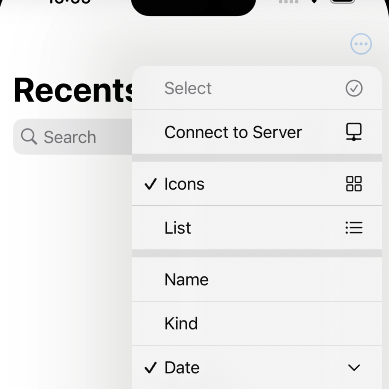
First, there is no menu option on navigation bar buttons in MAUI. No problem, I’ll just roll a platform specific version, using one of those aforementioned hooks.
And that’s how you start going down a rabbit hole; this one went a looong way down.
It turns out that MAUI doesn’t appear to use the native BarButtonItems, which makes hooking into features of those controls awkward. These are the compromises that are made for multi-platform, but sometimes it takes a long time to figure out what you just can’t do.
There are some areas that just can’t be glossed over. You still need a platform specific manifest file, and neither Apple nor Google have adopted a common standard, so you’ll always need some expertise on the platforms.
There are similar challenges when it comes to images. MAUI does a fascinating trick in the background by taking SVG graphics and compiling them down to PNG format images for the devices. Naturally you keep the fidelity of the images, and the process for the most part is transparent. Until you need to actually reference those images directly. Technically they don’t exist in their final form until build time. I love the thinking, I love the implementation, but I have lost actual chunks of hair trying to find the right references to images.
The other area that is just confusing is the Shell Navigation vs the Navigation Stack. So many blog posts, YouTube videos and document pages and still I just couldn’t get my head around it for the longest time. I’ll do a separate post on this specific issue and what I had to do, specifically to have a Login page launch before the main app can start, but for now let me just say I get the hint of a migraine still when I think about it.
Should You Move to MAUI
In Hawaii, I suspect the answer might be yes, though I haven’t tried that. For .NET MAUI, the question is a little more nuanced.
If you’re building an enterprise style App, and you’re already a .NET developer / team / organisation, then the answer is a simple yes.
If you’re looking to build a cross platform App for some industry vertical, where you’re not necessarily trying to leverage very low level, platform specific features, and where you’re not too constrained on meeting the expectations from a platform UI perspective, then the answer is to strongly consider it.
If you’re looking to build a consumer App, and you’re having to use deep levels of platform features, I’m still only 70% convinced, but moving higher the deeper I go. I think Microsoft can do a better job when it comes to supporting Mac developers; but similarly, I think Apple could finally get to where Microsoft got to in 2014 and recognise that there’s a whole wide world of developers out there that could be doing interesting things on their platform if they just made it a little easier.
In short, I feel that this little experiment is going to work out, and we’ll have MyStrongRoom back in the App store in the coming weeks, so I’m hanging on to MAUI for now.
Support Ukraine
The invasion of Ukraine is an act of aggression that we should all oppose and speak out against. I will continue to Stand with Ukraine and its people until peace is restored.
Photo by Travis Saylor: https://www.pexels.com/photo/road-closed-signage-951409/
 Bows and Arrows
Leave a comment